Compare Development Environments
Reach Technology offers three touchscreen display module product lines whose main differences are hardware and the development process.
Choose Between Three Development Environments
Serial Connection, Simple Commands
Build a user interface with your custom images or our image collection. Connect your system’s microcontroller to the SLCD modules using a standard asynchronous serial port.
Qt IDE with Drag-and-Drop
Use a Qt Integrated Development Environment with drag-and-drop tools to design a user interface. Connect to G2 modules using one of many I/O options.

Qt IDE with Drag-and-Drop
Use a Qt Integrated Development Environment with drag-and-drop tools to design a user interface. Choose from coding on a Linux machine with our Software Development Kit or use a pre-configured Virtual Machine for development. Connect to G3 modules using one of many I/O options.
SLCD Development Environment
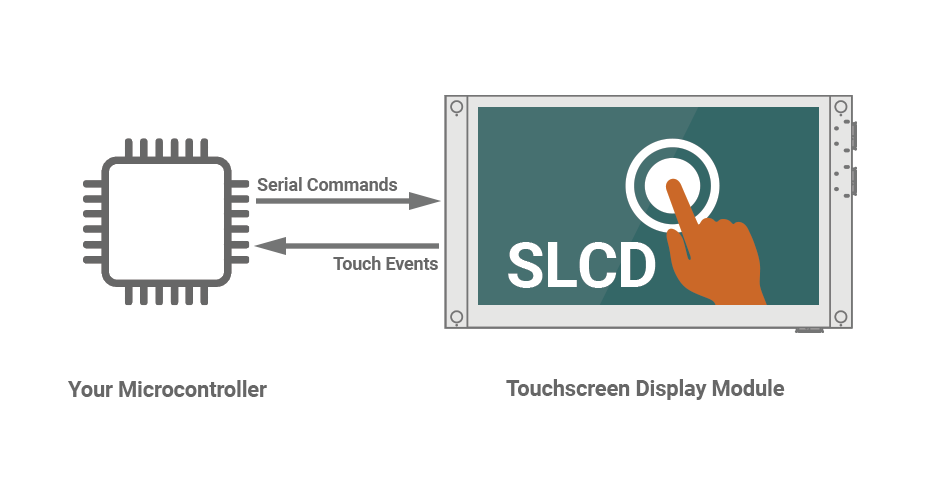
Connect your system’s microcontroller to the serial LCD controller via a standard asynchronous serial port. Use simple ASCII commands to draw images, text, controls, and other interface elements. Controls report back over the serial line when activated or changed. Images are stored on the embedded display’s SLCD controller board in flash memory.
Simple to Integrate
All microcontrollers, and even some DSP, have a serial port. In an upgrade situation, if no free port is available, the SLCD’s second serial port can be used in “pass-thru” mode to connect to the replaced device. Serial transmit and receive are easily interrupt- driven, and the received control packets are small, to minimize processor overhead.
Simple to Program
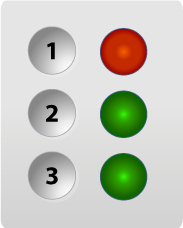
This simple control panel (see image at right) sets the state of three relays and shows the status of three signals. It is implemented by the following sample code. Get the Software Reference Manual  that contains a complete description of commands used in this example.
No Particular Operating System Required
SLCD modules work with any operating system, with or without a host OS. From full-blown, embedded systems running Windows, Linux, or QNX, to small RTOS, or a “bare metal” code, the LCD interface is the same.
GUI Builder Tool
Build a user interface with your custom images or our image collection. We recommend using standard bitmap image development and manipulation tools such as Adobe® Illustrator®, Adobe Photoshop®, or a free program called GIMP (GNU Image Manipulation Program) to create images for your interface. Then use our Screen Layout Utilities program (a plug-in for GIMP) for image placement. See how to do this in our video tutorials.
No Graphics Library Required
The library is built into SLCD modules. Your embedded system does not require additional memory overhead for library code and has more resources to perform its main tasks of controlling your product.
G2 Development Environment
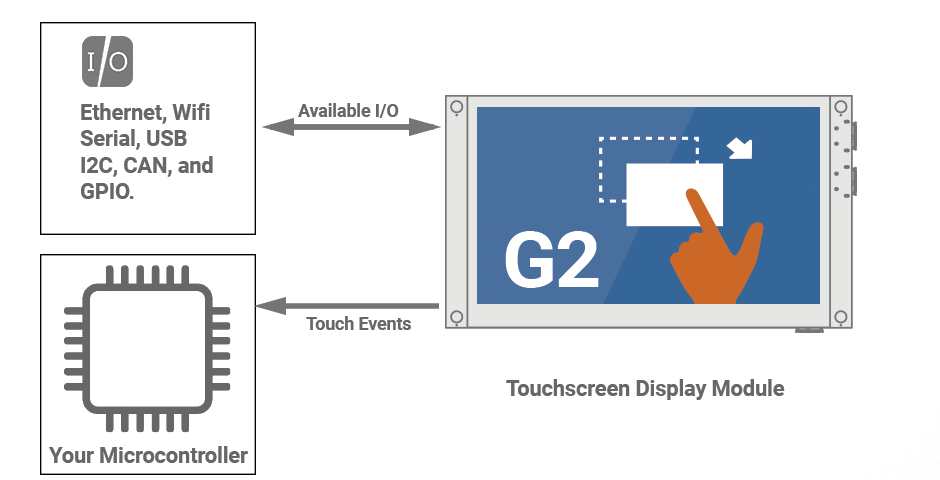
G2 modules interact with your system either via the module’s serial port to a microcontroller that handles I/O or directly using onboard interfaces including Ethernet, WiFi, USB, CAN, I2C, UART, etc. Use a Qt Integrated Development Environment with drag-and-drop tools to design a user interface or opt for a custom Linux distribution.
Integration Options
Choose between two main ways to connect modules to your system architecture.
Directly Using On-board Interfaces
G2 modules can act as miniature Linux panel PCs and connect to smart system components via any of their interfaces including Ethernet, WiFi, USB, CAN I2C, UART and more. Examples include:
- Embedded Web servers
- USB multifunction data acquisition modules
- CAN motor controls
Contact us to see how we can make this work for your project.
Via Serial Port to Microcontroller
G2 modules run your GUI and connect to agents to perform your product’s core functions, such as running a skin laser. We provide the software components, which include a translation layer that insulates the core function microcontroller from GUI changes. This separation allows GUI design to be flexible without requiring the embedded microcontroller code to be changed.
Programming Options
While G2 modules are Linux-based – you do not need to be a Linux developer to use them. Our solution allows developers to use Windows GUI tools and for Linux developers we provide a Virtual Machine with all the tools needed to develop.
Development Tools and Languages
Use development tools and languages familiar to you to design a user interface and control devices attached to a G2 module. There are several options to consider.
G3 Development Environment
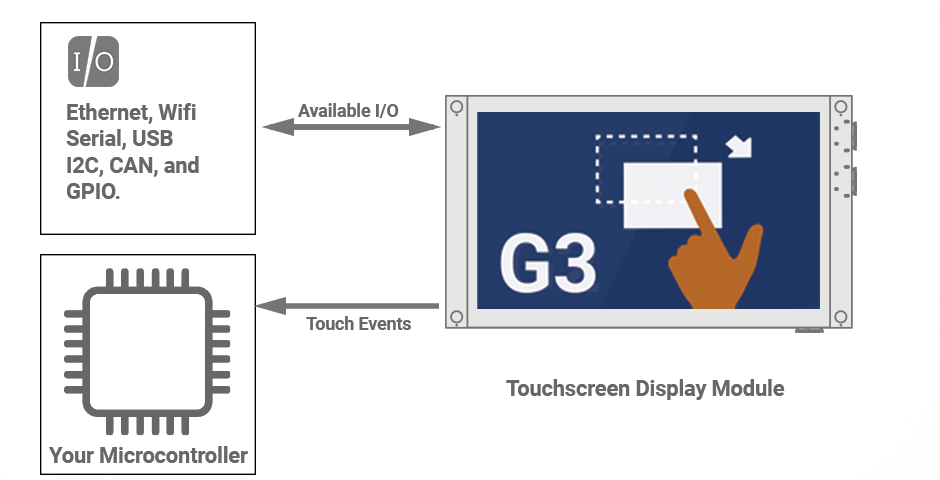
G3 modules communicate with your system through the module’s serial port connected to a microcontroller that manages I/O or directly through onboard interfaces, including Ethernet, WiFi, USB, CAN, I2C, UART, etc.
Integration Options
Select from two methods to integrate modules into your system architecture.
Directly Using On-board Interfaces
G3 modules can function as compact Linux panel PCs, establishing connections with intelligent system components through interfaces such as Ethernet, Wi-Fi, USB, CAN, I2C, UART, and additional options. Examples include:
- Medical Devices
- Automotive Interfaces
- Smart Home Control
Contact us to see how we can make this work for your project.
Via Serial Port to Microcontroller
The microcontroller is the intermediary for input and output operations and establishes a communication link with the display module using the serial connection. The microcontroller sends commands and receives data from the display through this connection for seamless interaction and control in embedded systems.
Programming Options
Our G3 modules support development in a native Linux desktop environment OR within a Linux Virtual Machine (VM) compatible with Windows, Mac, and Linux, giving you a choice of coding environments for development.
G3 modules offer versatile development options tailored to your preferences. You can seamlessly develop on a Linux machine using our dedicated Software Development Kit (SDK), which provides a native environment for efficient coding. Alternatively, use a Virtual Machine (VM) pre-configured with the tools you need to streamline your development process. Choose the approach that best aligns with your development workflow to ensure a smooth and customizable experience when creating your applications.
For comprehensive details on the G3 development process, please refer to the G3 Quick Start Guide or G3 Manual  , where you’ll find in-depth information.
Development Tools and Languages
Use development tools and languages familiar to you to design a user interface and control devices attached to a G3 module. There are several options to consider.
Install the G3 Developer Yocto SDK, built alongside the actual embedded image for the G3 module, on almost any Linux distribution. Get more details in our G3 Quick Start Guide or G3 Manual .
Qt (pronounced “cute”) is a free and open-source toolkit for creating graphical user interfaces and cross-platform applications that run on the G3 module. This tool is only available on the Qt versions of the G3 Developer VM. Get more details in our G3 Quick Start Guide or G3 Manual .
The Developer VM versions that support Qt development come with Qt 5.15.2 or greater pre-installed, the current LTS release.
Cross Compiler
The G3 Developer VM has an ARM cross-compiler toolchain (GCC 9.3.0 or later) pre-installed as part of the G3 Developer SDK.
Qt Creator
Qt Creator is a cross-platform Integrated Development Environment (IDE). Qt Creator runs on Windows, Linux, and macOS X desktop operating systems, allowing developers to create applications across desktop, mobile, and embedded platforms. This tool is only available on the Qt versions of the G3 Developer VM. The G3 Developer VM comes pre-installed with Qt Creator 4.11.0 or greater.
Harness the flexibility provided by Linux. G3 modules facilitate communication via RS-232, RS-485, I2C, CAN, Ethernet, and USB. Work closely with us to customize a Linux configuration according to your requirements, ensuring rigorous functionality testing and constant adaptation to your evolving needs. We can provide a personalized distribution of libraries tailored to your specifications. Get more details in our G3 Quick Start Guide, G3 Manual to contact us.
Embedded Touchscreens Made Easy:
Up in Days, Smoothly to Production. Get started with a Development Kit.
Reach Technology is now a part of Novanta.
Sales and Engineering
545 First Street
Lake Oswego, OR 97034
503-675-6464
sales@reachtech.com
techsupport@reachtech.com
Manufacturing
4600 Campus Place
Mukilteo, WA 98275
service@reachtech.com
Please send payments to:
Novanta Corporation
PO Box 15905
Chicago, IL 60693
accounts.receivable
@novanta.com